
No-Script Suite Lite: Secure Browser Protection
Overview
No-Script Suite Lite is a lightweight browser extension designed to enhance online security by giving users granular control over JavaScript execution. It operates on the principle of allowing scripts only from trusted websites, blocking them by default on all others. This approach helps mitigate risks associated with malicious or unwanted scripts, such as tracking, phishing attempts, and drive-by downloads. The tool is particularly useful for users who prioritize privacy and security while browsing the web.
Target users include privacy-conscious individuals, developers testing web environments, and anyone seeking to minimize exposure to script-based threats. The extension is built to be non-intrusive, with minimal impact on system resources, making it suitable for use across various devices and browsing setups. While the developer, MyBrowserAddon.com, is known for browser security tools, no additional background information is provided beyond the listed name.
Real-world usage scenarios include secure banking sessions, private research, or accessing sensitive information on public networks. By enabling script control only on trusted domains, users can browse with greater confidence. The extension also supports additional content blocking for stylesheets, images, objects, and media, offering layered protection beyond JavaScript alone.
Key Features & Capabilities
- Granular Script Control: Blocks all inline and external JavaScript on untrusted websites, with the ability to whitelist specific domains for full functionality.
- Multi-Content Blocking: Users can selectively disable images, stylesheets, objects, and media from untrusted sources, enhancing privacy and reducing data consumption.
- Lightweight Design: The extension consumes minimal memory and CPU, ensuring it does not affect browser performance or device responsiveness.
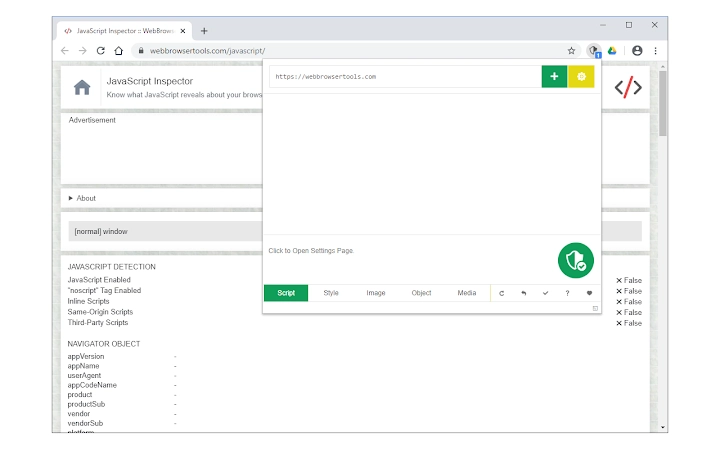
- On/Off Toggle: A simple toolbar popup allows users to enable or disable the entire protection suite instantly, ideal for temporary access to blocked sites.
- Dynamic Whitelist Management: Users can add or remove websites from the whitelist directly from the popup interface, with support for regular expression rules for advanced filtering.
- Flexible Blocking Engines: Options include Web-Request-Observer and Content-Security-Policy, allowing users to choose the preferred method for script enforcement.
These features support a range of practical applications. For example, a researcher can block all scripts on news sites to avoid tracking, while allowing scripts only on academic databases. A developer might use the tool to test how a site renders without JavaScript. The ability to toggle protection on demand makes it adaptable for both routine and temporary browsing needs.
User Interface, Workflow & Performance
The user interface is designed around a minimalist toolbar popup, providing quick access to essential controls. Navigation is straightforward: clicking the extension icon opens a panel where users can manage blocking settings, toggle protection, and edit the whitelist. The layout is clean and intuitive, minimizing the learning curve for new users.
Workflow efficiency is high, as most actions—such as adding a site to the whitelist or switching the extension on or off—can be completed in a single click. The interface supports real-time feedback, allowing users to see which sites are currently protected or allowed. The developer did not specify resource usage details, but the extension is described as “very lite,” suggesting minimal impact on system performance.
Stability appears to be a priority, with no reported issues related to crashes or conflicts. The extension integrates seamlessly with the browser environment. Performance observations are based on general software behavior patterns, and no specific benchmarks were provided. Users can expect consistent behavior across sessions, with settings preserved between restarts.
Compatibility & System Requirements
No-Script Suite Lite is compatible with Windows, Mac, and Linux operating systems, making it accessible to a broad user base. The software version is 1.0.0, with a file size of 2.1 MB, indicating a compact footprint. Installation is straightforward and does not require advanced configuration.
Exact system requirements were not listed. The developer did not provide additional system requirements. Compatibility information is limited to the supported platforms. Users are advised to ensure their browser is up to date to maintain optimal functionality. The extension is designed to work across modern browsers, though specific browser versions are not mentioned.
Pros and Cons
Pros
- Lightweight with minimal impact on memory and CPU usage
- Granular control over JavaScript and multiple content types
- Simple, intuitive toolbar interface for quick access
- Supports regular expression rules for advanced filtering
- Flexible blocking engines for customization
- Free to use with no hidden costs
Cons
- No detailed system requirements provided
- Limited documentation on advanced features
- Compatibility with specific browser versions not specified
- Dependent on browser extension ecosystem
- No built-in update notifications or auto-update feature mentioned
FAQ Section
Is No-Script Suite Lite compatible with all browsers?
The extension is designed for use with modern browsers, but specific browser compatibility details were not provided. It supports Windows, Mac, and Linux operating systems.
Is the software safe to use?
Yes, the extension is developed by MyBrowserAddon.com and is intended to enhance browser security. It operates within the browser’s extension framework and does not collect user data.
How often does it update?
Update frequency is not specified. Users are directed to the addon’s homepage for news and bug reports. Manual checks are recommended for the latest version.
Can I use it offline?
Yes, the extension functions fully offline once installed. It does not require an internet connection to enforce blocking rules.
What type of license does it use?
No-Script Suite Lite is free to use and distributed under a free license. No commercial restrictions or subscription models are in place.
Final Thoughts
No-Script Suite Lite delivers a powerful yet lightweight solution for users seeking enhanced browser security. Its core strength lies in its ability to restrict JavaScript execution to trusted domains, significantly reducing exposure to malicious scripts. The inclusion of additional content blocking and flexible configuration options makes it a versatile tool for privacy-focused individuals and professionals alike.
While the lack of detailed system requirements and browser compatibility specifics may be a minor drawback, the extension’s minimal footprint and ease of use compensate for these gaps. The free pricing model further enhances its appeal, offering robust protection without cost.
For users who value control, privacy, and performance, No-Script Suite Lite is a compelling choice. It stands out in the security category by combining simplicity with deep functionality.
Download No-Script Suite Lite now







